Email security
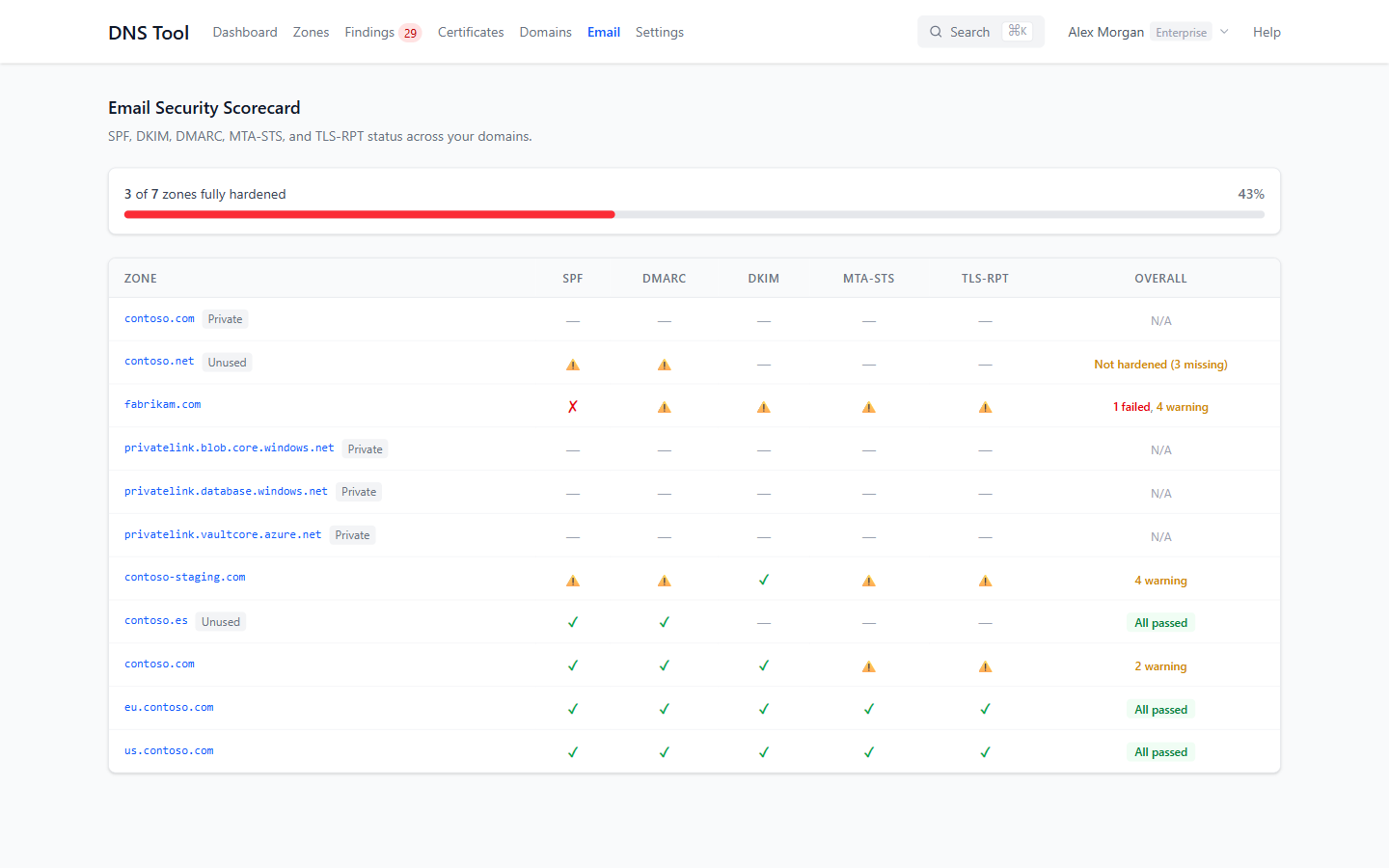
Most email spoofing works because of what a domain's DNS doesn't say. Email in the top bar opens the Email Security Scorecard: for every public zone, whether its SPF, DMARC, DKIM, MTA-STS and TLS-RPT records protect it, and whether domains that don't send mail say so.
Reading the scorecard
The bar at the top shows how many of your mail-handling zones are fully hardened — every applicable check passes. Zones that need the most attention are listed first.
| Symbol | Means |
|---|---|
| ✓ | No issues found. |
| ⚠ | Warning-level findings. |
| ✗ | Error or critical findings. |
| — | Not applicable: a private zone, a zone that doesn't handle mail, or a protocol that doesn't apply to a domain that neither sends nor receives mail. |
The Overall column sums it up: All passed, the number of failed and warning checks, No mail for a zone that isn't set up for email, N/A for private zones, or Not hardened for an unused domain that's missing the no-mail defaults.
Every symbol comes from the zone's findings, so the scorecard and the findings list always agree. To fix a protocol, open the zone's findings and follow How to fix.
What each column checks
| Column | Checks | Example findings |
|---|---|---|
| SPF | Who may send mail as the domain | Missing SPF, more than one SPF record, +all or ?all, more than 10 DNS lookups, void lookups, include loops |
| DMARC | What receivers do with mail that fails SPF/DKIM | Missing DMARC, p=none without a reporting address |
| DKIM | That outgoing mail can be signed and verified | No DKIM record for any known selector, malformed key |
| MTA-STS | That mail to you can't be downgraded to unencrypted | Missing or malformed _mta-sts record |
| TLS-RPT | That you receive reports about failed TLS delivery | Missing or malformed _smtp._tls record |
DKIM is checked for the well-known selectors of Microsoft 365, Google Workspace and other common services. If you use your own selector, add it on the zone's page under Custom DKIM Selectors; see Zones & records.
Domains that don't send mail
A domain with no mail configuration can still be spoofed. DNS Tool marks it Unused and checks that it publishes the three no-mail defaults:
@        MX   0 .                       ; null MX: accepts no mail (RFC 7505)
@        TXT  "v=spf1 -all"             ; nobody may send as this domain
_dmarc   TXT  "v=DMARC1; p=reject;"     ; reject anything that claims to
A domain that publishes all three shows All passed; one that's missing any shows Not hardened with the number missing.
See the Email Security group in the validation rules reference for every check.